




















































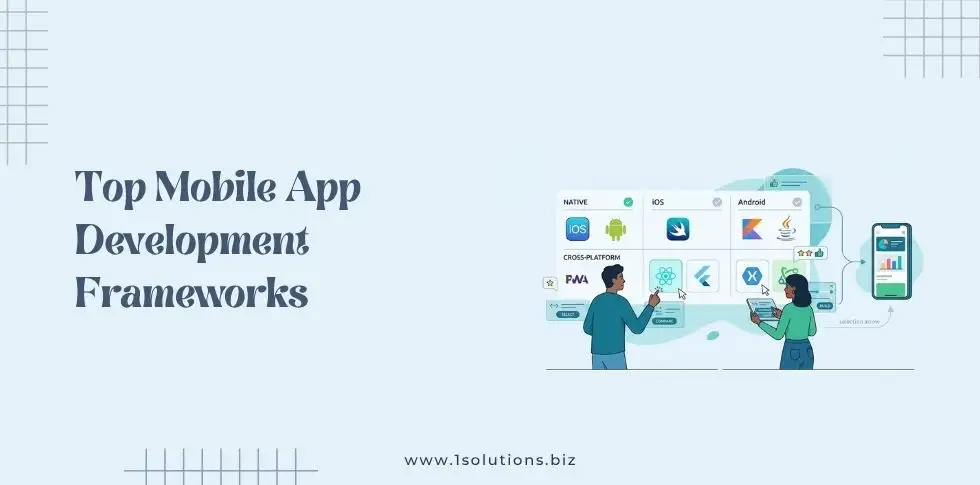
Mobile apps have become essential for businesses to connect with their customers. Choosing the right development framework can make or break your project’s success. The framework you select affects everything from development speed to app performance and long-term maintenance costs.
Mobile app development frameworks provide pre-built components, libraries, and tools that speed up the development process. They help developers create apps faster while maintaining quality and consistency. With dozens of frameworks available, finding the perfect match for your project requirements can feel overwhelming.
This guide explores the most popular and effective mobile app development frameworks in 2026. We’ll examine their strengths, weaknesses, and ideal use cases to help you make an informed decision. Whether you’re building your first app or expanding your development capabilities, understanding these frameworks will set you up for success.
Native Development Frameworks
Native frameworks allow developers to build apps specifically for one platform using the platform’s native programming languages and tools. These frameworks provide direct access to device features and typically deliver the best performance.
iOS Development with Swift and Objective-C
Apple’s native development environment offers two primary programming languages for iOS app development. Swift, introduced in 2014, has become the preferred choice for modern iOS development due to its clean syntax and powerful features.
Swift provides excellent performance, memory safety, and seamless integration with Apple’s ecosystem. The language supports both procedural and object-oriented programming paradigms. Developers can leverage extensive libraries and frameworks like UIKit, Core Data, and Core Animation.
Objective-C remains relevant for maintaining legacy applications and working with existing codebases. Many established apps still use Objective-C, and developers often need to understand both languages for comprehensive iOS development.
The main advantages of native iOS development include optimal performance, full access to iOS features, and adherence to Apple’s design guidelines. However, this approach requires separate development for Android platforms and demands iOS-specific expertise.
Android Development with Java and Kotlin
Google’s Android platform traditionally used Java for native app development. In 2017, Google announced first-class support for Kotlin, which has gained significant popularity among Android developers.
Kotlin offers 100% interoperability with Java while providing modern language features like null safety, extension functions, and coroutines. The language reduces boilerplate code and improves developer productivity. Google now recommends Kotlin for new Android projects.
Java remains widely used, especially in enterprise environments and legacy applications. The vast Java ecosystem provides extensive libraries and frameworks. Many developers already know Java, making the learning curve minimal.
Native Android development provides optimal performance, complete access to Android APIs, and adherence to Material Design principles. The framework supports various device types, screen sizes, and Android versions. However, like iOS development, it requires separate development for other platforms.
Cross-Platform Development Frameworks
Cross-platform frameworks enable developers to write code once and deploy it across multiple platforms. This approach reduces development time and costs while maintaining reasonable performance for most applications.
React Native
Facebook created React Native to bring React’s component-based architecture to mobile development. The framework allows developers to build native mobile apps using JavaScript and React principles.
React Native renders native components instead of web components, providing better performance than traditional hybrid approaches. The framework supports hot reloading, enabling developers to see changes instantly during development. This feature significantly speeds up the development process.
The framework’s component-based architecture promotes code reusability and maintainability. Developers can share business logic between platforms while customizing platform-specific features when needed. React Native also supports third-party plugins and has a large community ecosystem.
Major companies like Facebook, Instagram, Airbnb, and Tesla use React Native for their mobile applications. The framework works well for apps requiring native performance with cross-platform compatibility. However, apps with heavy graphics or complex animations might face performance limitations.
Learning React Native is easier for developers familiar with React and JavaScript. The framework provides extensive documentation and community support. For businesses looking to leverage existing web development skills, React Native offers an attractive path to mobile development.
Flutter
Google developed Flutter as a comprehensive solution for building natively compiled applications across multiple platforms. The framework uses Dart programming language and provides its own rendering engine.
Flutter’s widget-based architecture allows developers to create highly customizable user interfaces. Every element in Flutter is a widget, from buttons to entire screens. This approach provides consistent behavior across platforms and enables pixel-perfect designs.
The framework includes a rich set of pre-built widgets that follow Material Design and Cupertino design guidelines. Developers can create custom widgets to meet specific design requirements. Flutter’s hot reload feature enables rapid development and testing.
Flutter compiles to native ARM code, providing excellent performance comparable to native applications. The framework handles graphics rendering internally, reducing platform-specific variations. This approach ensures consistent appearance and behavior across different devices.
Google uses Flutter for several of its products, including Google Ads and Google Pay. The framework is gaining adoption among businesses seeking efficient cross-platform development. Flutter works well for apps requiring custom UI designs and consistent cross-platform experiences.
The main challenge with Flutter is learning Dart, which is less common than JavaScript or other popular languages. However, Dart’s simple syntax makes it accessible to developers from various backgrounds.
Xamarin
Microsoft’s Xamarin platform enables developers to create native mobile applications using C# and the .NET framework. The platform provides two main development approaches: Xamarin.Forms for maximum code sharing and Xamarin.Native for platform-specific development.
Xamarin.Forms allows developers to share UI code across platforms while maintaining native performance. The framework provides a single API for accessing platform-specific features. Developers can customize platform-specific behaviors when needed.
Xamarin.Native offers separate projects for each platform while sharing business logic through shared libraries. This approach provides more control over platform-specific features and UI customization. Developers can access the full native API surface of each platform.
The platform integrates seamlessly with Microsoft’s development ecosystem, including Visual Studio, Azure DevOps, and App Center. Organizations already using Microsoft technologies can leverage existing infrastructure and expertise. The integration with Azure DevOps provides comprehensive development lifecycle management.
Xamarin provides strong performance through native compilation and direct access to platform APIs. The framework supports complex business applications and integrates well with enterprise systems. However, the platform requires familiarity with C# and the .NET ecosystem.
Hybrid Development Frameworks
Hybrid frameworks combine web technologies with native containers to create mobile applications. These frameworks use HTML, CSS, and JavaScript to build apps that run inside native webview containers.
Apache Cordova (PhoneGap)
Apache Cordova, originally known as PhoneGap, allows developers to build mobile applications using web technologies. The framework wraps web applications in native containers and provides access to device features through plugins.
Cordova’s plugin architecture enables access to native device features like camera, GPS, contacts, and file system. Developers can use existing plugins or create custom plugins for specific requirements. The framework supports multiple platforms including iOS, Android, and Windows.
The main advantage of Cordova is leveraging existing web development skills and codebases. Developers familiar with HTML, CSS, and JavaScript can create mobile apps without learning new programming languages. This approach can significantly reduce development time and costs.
However, Cordova applications typically have lower performance compared to native or other cross-platform solutions. The webview-based approach can create performance bottlenecks, especially for graphics-intensive applications. User interface elements might not perfectly match platform-specific design guidelines.
Cordova works best for content-focused applications, simple business apps, and prototypes. The framework is suitable when rapid development and web technology expertise are primary considerations. Organizations with strong web development teams might find Cordova an efficient path to mobile development.
Ionic
Ionic builds upon Apache Cordova to provide a complete hybrid app development framework. The platform combines web technologies with native-style UI components and performance optimizations.
Ionic provides a comprehensive library of mobile-optimized UI components that mimic native interface elements. The framework follows platform-specific design guidelines, creating apps that feel native to each platform. Developers can customize components to match brand requirements.
The framework supports popular web frameworks including Angular, React, and Vue.js. This flexibility allows development teams to use familiar tools and maintain consistency with web applications. Ionic also provides its own CLI tools for project generation, building, and deployment.
Ionic Capacitor, the modern successor to Cordova, provides improved performance and better plugin management. Capacitor offers a more modern approach to accessing native device features while maintaining compatibility with existing Cordova plugins.
The platform includes additional services like Ionic AppFlow for continuous integration and deployment. These services help teams manage the entire app development lifecycle. Ionic works well for teams with strong web development skills who want to create mobile apps quickly.
Performance considerations apply to Ionic as with other hybrid frameworks. Apps with complex animations or heavy data processing might experience limitations. However, recent improvements in mobile browser engines have significantly enhanced hybrid app performance.
Progressive Web App Frameworks
Progressive Web Apps (PWAs) represent a modern approach to mobile app development using web technologies. PWAs provide app-like experiences while running in web browsers, eliminating the need for app store distribution.
Angular PWA
Angular provides built-in support for creating Progressive Web Apps through its PWA schematic. The framework automatically configures service workers, manifest files, and caching strategies to create app-like experiences.
Angular PWAs support offline functionality, push notifications, and home screen installation. The framework’s service worker integration enables sophisticated caching strategies and background synchronization. These features create seamless user experiences even with poor network connectivity.
The Angular CLI simplifies PWA development by generating necessary configuration files and implementing best practices. Developers can leverage Angular’s component architecture, dependency injection, and routing capabilities while adding PWA features.
Angular PWAs work well for content-heavy applications, e-commerce sites, and business applications. The framework provides excellent performance through lazy loading, tree shaking, and ahead-of-time compilation. However, PWAs have limited access to device features compared to native applications.
React PWA
React applications can be enhanced with PWA capabilities using various tools and libraries. Create React App includes PWA templates and service worker configuration to get started quickly.
React PWAs benefit from the framework’s component-based architecture and extensive ecosystem. Developers can use state management libraries, routing solutions, and UI frameworks while adding PWA features. The flexibility of React allows for highly customized PWA implementations.
Popular libraries like Workbox simplify service worker implementation and caching strategies. React PWAs can achieve excellent performance through code splitting, lazy loading, and efficient state management. The framework’s virtual DOM provides smooth user interactions.
React PWAs are particularly suitable for content platforms, social applications, and dashboard interfaces. The approach works well when app store distribution is not required and web-based deployment is preferred.
Choosing the Right Framework
Selecting the appropriate mobile app development framework depends on multiple factors including project requirements, team expertise, budget constraints, and timeline considerations.
Performance Requirements
Applications requiring maximum performance should consider native development frameworks. Games, graphics-intensive apps, and applications with complex calculations benefit from native optimization. Native frameworks provide direct access to platform APIs and hardware acceleration.
Cross-platform frameworks like Flutter and React Native offer good performance for most business applications. These frameworks balance development efficiency with acceptable performance. They work well for apps with standard user interfaces and moderate performance requirements.
Hybrid frameworks and PWAs are suitable for content-focused applications and simple business apps. These approaches prioritize development speed and cost-effectiveness over maximum performance. Recent improvements in mobile browsers have made hybrid apps more viable for many use cases.
Development Team Skills
Existing team expertise significantly influences framework selection. Teams with strong web development skills can leverage frameworks like React Native, Ionic, or PWA technologies. Organizations with .NET expertise might prefer Xamarin for mobile development.
Consider the learning curve and training requirements for different frameworks. Some frameworks require learning new programming languages, while others build upon existing web technologies. Factor in the time and cost of skill development when making decisions.
Team size and project timeline also affect framework choice. Smaller teams might benefit from cross-platform frameworks that enable broader platform coverage with limited resources. Larger teams can potentially handle multiple native development streams.
Budget and Timeline Constraints
Cross-platform frameworks typically reduce development costs by enabling code sharing between platforms. Single codebases require less maintenance and fewer developers. This approach can significantly impact project budgets and timelines.
Native development requires separate teams or developers for each platform. While this approach provides optimal results, it increases development costs and complexity. Consider whether platform-specific optimization justifies the additional investment.
Hybrid frameworks and PWAs often provide the fastest development cycles for simple applications. These approaches leverage existing web development skills and assets. However, ensure that performance and feature requirements can be met within these constraints.
Platform Coverage
Determine which platforms your application needs to support. If iOS and Android coverage is essential, cross-platform frameworks provide efficient solutions. Native development requires separate efforts for each platform.
Consider future platform requirements and expansion plans. Cross-platform frameworks provide flexibility for adding new platforms later. Native development might create challenges when expanding to additional platforms.
Some frameworks support more platforms than others. Flutter supports mobile, web, and desktop applications from a single codebase. React Native primarily focuses on mobile platforms but has experimental support for other platforms.
Framework Selection Best Practices
Making the right framework choice requires careful evaluation of technical and business requirements. These best practices help guide the decision-making process.
Prototype and Evaluate
Create small prototypes using shortlisted frameworks to evaluate their suitability. Prototyping helps identify potential issues and validates technical assumptions. Test key features and performance requirements during the prototype phase.
Evaluate development productivity, debugging capabilities, and deployment processes. Consider how well each framework integrates with existing development workflows and tools. Assess the learning curve and documentation quality.
Compare prototype results with project requirements and constraints. Look for potential bottlenecks or limitations that might affect the final application. Use prototype feedback to refine framework selection criteria.
Consider Long-term Maintenance
Framework selection affects long-term maintenance costs and complexity. Evaluate the framework’s update frequency, backward compatibility, and migration paths. Consider how framework updates might impact existing applications.
Assess the availability of developers with framework expertise in the job market. Popular frameworks typically have larger talent pools and better community support. Less common frameworks might create hiring and maintenance challenges.
Review the framework’s roadmap and future development plans. Ensure that the framework aligns with long-term project goals and technology strategies. Avoid frameworks with uncertain futures or declining community support.
Similar to how businesses need to consider long-term strategies for web development, as discussed in our guide on top frameworks for JavaScript app development, mobile framework selection requires strategic thinking about future needs and maintenance requirements.
Evaluate Community and Ecosystem
Strong community support provides valuable resources for learning, troubleshooting, and extending framework capabilities. Look for active forums, documentation, tutorials, and third-party libraries.
Assess the availability of plugins, packages, and integrations for required features. Comprehensive ecosystems reduce development time and provide tested solutions for common requirements. Avoid frameworks with limited third-party support.
Consider commercial support options for enterprise applications. Some frameworks offer professional support, training, and consulting services. Enterprise applications might benefit from vendor support and service level agreements.
Future Trends in Mobile App Development
Mobile app development continues evolving with new technologies, user expectations, and business requirements. Understanding future trends helps make informed framework decisions.
AI and Machine Learning Integration
Artificial intelligence and machine learning capabilities are becoming standard requirements for mobile applications. Frameworks increasingly provide built-in AI integration tools and libraries.
Modern frameworks support on-device AI processing for improved privacy and performance. Edge computing capabilities reduce server dependencies and improve user experiences. Consider framework support for AI libraries and model deployment.
The integration of AI technologies mirrors trends we see in other areas of development, similar to the AI SEO strategies that are reshaping digital marketing approaches.
Internet of Things (IoT) Connectivity
Mobile applications increasingly serve as control interfaces for IoT devices and smart home systems. Frameworks need to support various communication protocols and device integration APIs.
Consider framework capabilities for Bluetooth, WiFi, and other connectivity options. IoT applications often require background processing, real-time communication, and device management features. Evaluate framework support for these requirements.
Enhanced Security Requirements
Growing security concerns drive demand for robust security features in mobile applications. Frameworks need to provide secure storage, communication encryption, and authentication capabilities.
Biometric authentication, secure enclaves, and advanced encryption become standard requirements. Evaluate framework security features and compliance capabilities for your application requirements.
Privacy regulations like GDPR and CCPA affect mobile app development practices. Ensure chosen frameworks support privacy-focused development patterns and data protection requirements.
Implementation Strategy
Successfully implementing mobile app development requires strategic planning beyond framework selection. Consider these implementation factors for project success.
Development Process Integration
Integrate mobile app development with existing development processes and tools. Consider how the chosen framework fits with version control, continuous integration, and deployment pipelines.
Establish testing strategies that cover multiple devices, platforms, and use cases. Mobile applications require extensive testing due to device fragmentation and varying network conditions. Plan for automated testing integration.
Consider how mobile development integrates with backend services and APIs. Many applications require synchronization with web applications or enterprise systems. Plan for consistent development practices across platforms.
Team Training and Skill Development
Invest in team training for chosen frameworks and mobile development best practices. Provide access to learning resources, courses, and certification programs. Consider mentorship programs for knowledge transfer.
Plan for gradual skill development rather than expecting immediate expertise. Allow time for teams to become proficient with new frameworks and tools. Consider starting with smaller projects to build experience.
Establish coding standards and best practices specific to mobile development. Create documentation and guidelines for consistent development approaches. Regular code reviews help maintain quality and share knowledge.
Quality Assurance and Testing
Mobile applications require comprehensive testing strategies covering functionality, performance, and user experience. Plan for testing across different devices, screen sizes, and operating system versions.
Implement automated testing for regression testing and continuous integration. Consider device testing services that provide access to various hardware configurations. Monitor application performance in production environments.
User acceptance testing becomes crucial for mobile applications due to touch interfaces and usage patterns. Conduct usability testing with real users on actual devices. Gather feedback early and iterate based on user input.
Ready to turn your mobile app idea into reality? Our experienced development team can help you choose the right framework and build powerful mobile applications that engage your users and drive business growth. Get a free proposal today and discover how we can bring your mobile app vision to life.
Frequently Asked Questions
Which mobile app development framework is best for beginners?
React Native is often considered the best framework for beginners who have web development experience. It uses JavaScript and React concepts that many developers already know. Flutter is also beginner-friendly due to its excellent documentation and comprehensive tutorials. For developers with no programming experience, hybrid frameworks like Ionic might be easier to start with since they use familiar web technologies.
Can cross-platform frameworks match native app performance?
Modern cross-platform frameworks like Flutter and React Native can achieve performance close to native applications for most use cases. Flutter compiles to native code and provides excellent performance for UI-intensive applications. React Native renders native components and performs well for business applications. However, native development still provides the best performance for graphics-intensive apps, games, and applications requiring maximum hardware optimization.
How much does mobile app development cost with different frameworks?
Cross-platform frameworks typically reduce development costs by 30-50% compared to native development. React Native and Flutter enable code sharing between platforms, reducing development time and maintenance costs. Native development requires separate efforts for iOS and Android, increasing costs but providing optimal performance. Hybrid frameworks offer the lowest development costs but might require additional optimization work. Consider long-term maintenance costs when comparing framework options.
Which framework is best for enterprise mobile applications?
For enterprise applications, consider Xamarin if your organization uses Microsoft technologies, as it integrates well with enterprise systems and provides robust security features. React Native works well for enterprises needing rapid development and cross-platform coverage. Native development might be preferred for applications requiring maximum security, performance, or platform-specific features. Flutter is gaining adoption in enterprise environments due to its performance and consistency across platforms.
How do I migrate an existing app to a different framework?
App migration requires careful planning and often involves complete redevelopment rather than direct code translation. Start by analyzing existing app features, user flows, and business logic. Choose the new framework based on current requirements rather than trying to replicate old implementations. Plan for gradual migration if possible, starting with less critical features. Consider maintaining the old app during migration to ensure business continuity. Budget for thorough testing and user acceptance validation after migration.
What factors should influence my framework choice in 2026?
In 2026, consider AI integration capabilities, as machine learning features become standard in mobile apps. Evaluate framework support for emerging technologies like AR/VR, IoT connectivity, and edge computing. Security requirements continue growing, so choose frameworks with strong security features and regular updates. Consider developer productivity tools, hot reload capabilities, and debugging features. Long-term support and community activity remain crucial factors for sustainable development.
Are Progressive Web Apps replacing traditional mobile apps?
Progressive Web Apps are growing in popularity but are not completely replacing traditional mobile apps. PWAs work well for content-focused applications, e-commerce sites, and business tools that don’t require extensive device integration. Traditional mobile apps still provide better performance, fuller device feature access, and superior user experiences for complex applications. Many businesses adopt hybrid strategies, using PWAs for broader reach and native apps for premium experiences. The choice depends on specific user needs and business requirements.
Final Thought
Mobile apps have become essential for businesses to connect with their customers. Choosing the right mobile app development frameworks can make or break your project’s success. The framework you select affects everything from development speed to app performance and long-term maintenance costs.
Mobile app development frameworks provide pre-built components, libraries, and tools that speed up the development process. They help developers create apps faster while maintaining quality and consistency. With dozens of frameworks available, finding the perfect match for your project requirements can feel overwhelming.
This guide explores the most popular and effective mobile app development frameworks in 2026. We’ll examine their strengths, weaknesses, and ideal use cases to help you make an informed decision. Whether you’re building your first app or expanding your development capabilities, understanding these frameworks will set you up for success.












 in India