








































































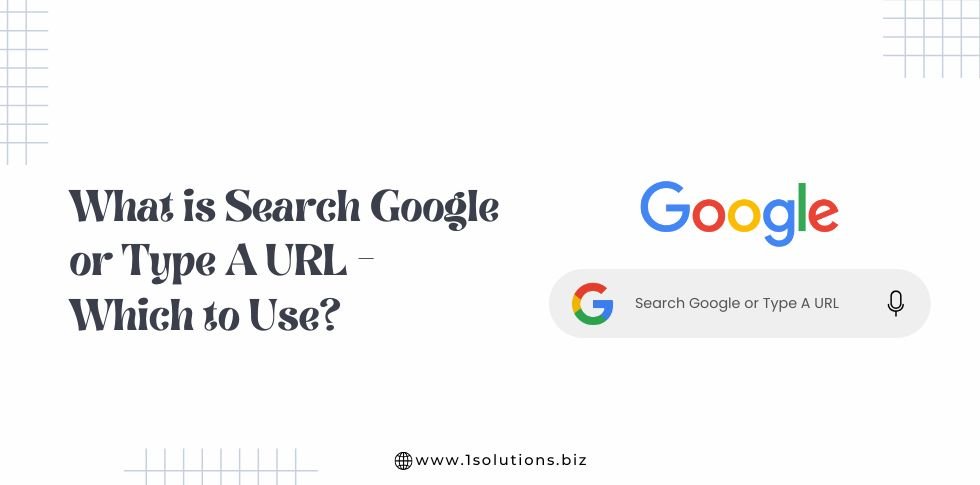
When you open a new browser tab in Chrome, Edge, or Safari, you are greeted by a single input field that says Search Google or type a URL.
This field is known as the Omnibox, a term used to describe the combined search and address bar that modern browsers rely on.
The Omnibox is designed to simplify browsing by allowing users to either search the web or go directly to a website from one place. While it looks simple, the way it works has a meaningful impact on how people navigate the internet every day.
Most users interact with the Omnibox dozens of times a day without thinking about the choice they are making. Typing a brand name, a question, or a full website address triggers very different outcomes behind the scenes.
In one case, the browser sends your query to Google Search, showing ads, organic results, and rich features. In the other, it takes you straight to a specific website without involving search results at all.
Understanding this difference Search Google or type a URL helps users browse faster and more safely, and it helps businesses understand how people actually find their websites.
The decision to search Google or type a URL also affects privacy, trust, and website traffic quality.
For businesses and marketers, it influences how traffic is measured, how brand authority is built, and why direct visits often convert better than search driven visits.
This article breaks down what the Omnibox really does, how browsers interpret your intent, and which option you should use in different situations.
What Does Search Google or Type a URL Mean
The phrase Search Google or type a URL appears inside the Omnibox to guide users on how they can use it.
It means that the same input field can perform two different actions depending on what you enter. The browser decides whether you want to run a Google search or visit a specific website based on the format and intent of your input.
If you type a question, keyword, or brand name, the browser treats it as a Google search. It sends the query to Google Search, which then displays search results that may include ads, featured snippets, maps, and organic listings. This is the most common behaviour for users who are researching information or looking for options.
If you type a complete website address, such as a domain name with or without extensions like .com, the browser understands that you want to visit that site directly. In this case, it bypasses Google Search results and takes you straight to the destination website.
In simple terms, the Omnibox tries to understand your intent and chooses the fastest path to get you where you want to go.
How Browsers Decide What You Mean
Modern browsers use pattern recognition to decide whether your input is a search or a URL. Some common signals include:
- Presence of a domain extension such as .com, .org, or .net
- Use of slashes or folders like /blog or /login
- Inclusion of https or www
- Clear spelling of a known website name
If none of these are present, the browser assumes you want to search Google.
A Simple Real World Example
Imagine you want to visit the 1Solutions website.
- If you type 1Solutions digital marketing services, the browser performs a Google search and shows multiple results, including competitors, ads, and blog pages.
- If you type 1solutions.biz, the browser takes you directly to the 1Solutions website without showing search results.
Now consider a different situation.
- Typing best SEO company for small businesses will trigger a Google search because it is clearly a query.
- Typing facebook.com will take you straight to Facebook because it is recognised as a valid URL.
This difference may seem small, but it changes how users reach websites and how businesses track and value traffic.
Why This Matters for Users and Businesses
For users, knowing when to search and when to type a URL saves time and reduces confusion. It also helps avoid clicking on misleading ads or unofficial websites.
For businesses, this behaviour affects traffic quality. Users who type a URL usually already trust the brand and are more likely to convert. Search driven visitors are often still comparing options. Understanding this distinction helps marketers improve branding, SEO strategies, and user experience design.
This is why the simple message Search Google or type a URL is more than a prompt. It reflects how modern browsing works and why intent matters every time someone opens a new tab.
The phrase Search Google or type a URL refers to a browser feature known as the address bar or omnibox. Instead of separating the search box from the address bar, modern browsers combine both into one field.
When you enter text into this field, the browser decides whether:
- You want to perform a Google search
- You want to visit a specific website directly
This decision is made automatically based on how your input looks.
What Happens When You Search Google
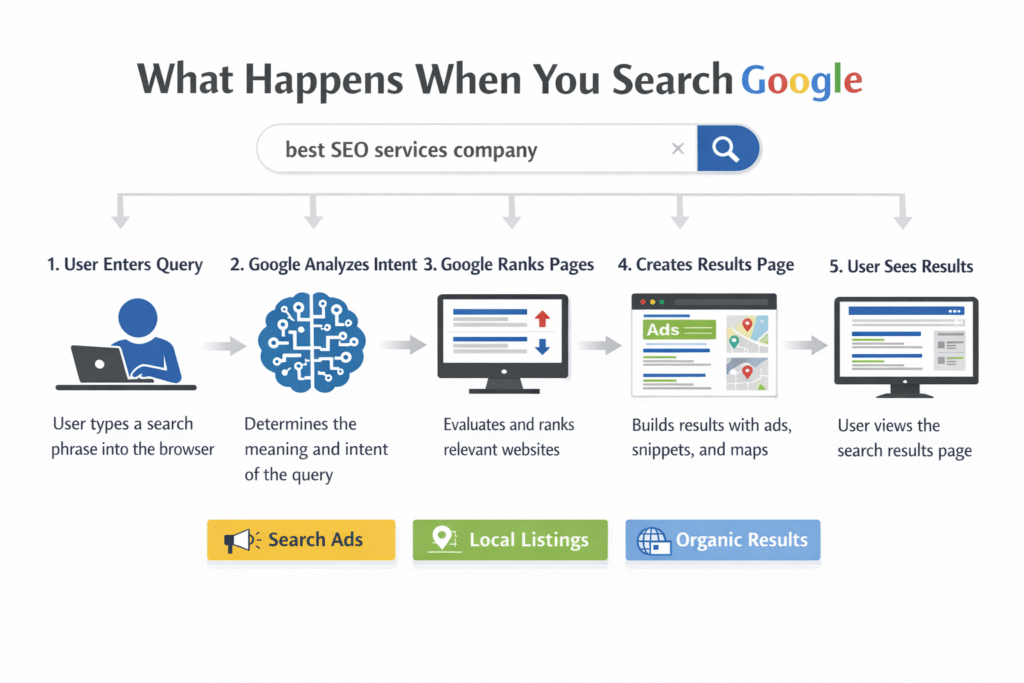
When you type a query into the browser and press enter without specifying a full website address, the browser sends your input to Google Search. From that moment, a complex process begins behind the scenes, even though the results appear on your screen within seconds.
First, Google analyses your query to understand search intent. It looks at the words you used, their order, and how similar searches have behaved in the past.
Google then decides whether you are looking for information, a specific website, a product, a local business, or an action such as signing up or buying something.
Once intent is identified, Google scans its massive index of web pages. This index contains trillions of pages that Google has already crawled and stored. Google does not search the live internet in real time. Instead, it retrieves results from this stored index and ranks them using hundreds of ranking signals.
These ranking signals include content relevance, page quality, loading speed, mobile usability, backlinks, user engagement signals, and topical authority. Google also considers freshness when the query relates to current events or trends.
After ranking the results, Google builds the Search Engine Results Page. This page may include several elements beyond traditional organic links.
What Appears on the Search Results Page
Depending on the query, users may see:
- Paid advertisements at the top or bottom of the page
- Featured snippets that directly answer the question
- People Also Ask boxes with related queries
- Local map listings for location based searches
- Images, videos, or shopping results
- Organic search listings ranked by relevance
This means that when someone searches Google, they are not just seeing websites. They are seeing a curated mix of content types designed to match intent as quickly as possible.
Example of a Google Search in Action
Suppose a user types best seo services company into the browser.
Google interprets this as a commercial research query. It may show ads from agencies bidding on the keyword, followed by organic listings of agencies, comparison articles, and review platforms. A local map pack may also appear if Google detects local intent.
Now compare that to typing 1Solutions digital marketing.
In this case, Google understands brand intent. It is likely to show the official 1Solutions website, related blog articles, and possibly the Google Business Profile listing. The results are more focused and brand specific.
Why Google Search Behaviour Matters
Searching Google exposes users to multiple options, opinions, and sources. This is helpful for research, comparison, and discovery. However, it also introduces distractions such as ads, competitors, and review sites.
For businesses, this means that appearing in search results requires strong SEO, content quality, and trust signals. Unlike direct URL visits, Google Search traffic is competitive and influenced by algorithm changes, user behaviour, and industry trends.
Understanding what happens when users search Google helps explain why search visibility matters and why typing a URL often signals stronger brand recognition and higher intent.
This difference is critical for marketers, business owners, and website creators who want to attract the right audience at the right stage of the customer journey.
What Happens When You Type a URL
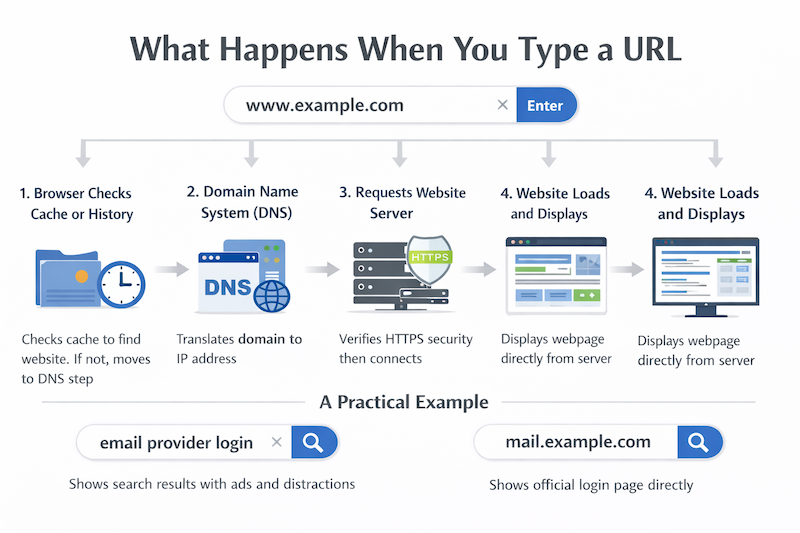
When you type a URL into the browser address bar and press Enter, the browser skips the search engine entirely and attempts to connect directly to the website you requested. This process is faster and more direct than searching because it removes several steps involved in search result generation.
The first thing the browser does is check whether the website address is already stored in its cache or browsing history. If you have visited the site before, the browser may already know where to send the request, which can speed up loading time.
If the site is not cached, the browser contacts the Domain Name System, often referred to as DNS. DNS acts like the internet phonebook. It translates the human readable website name into a numerical IP address that computers use to locate servers. Without this step, the browser would not know where the website lives on the internet.
Once the IP address is found, the browser sends a request to the website server asking for the page content. At this stage, security checks occur. If the website uses HTTPS, the browser verifies the security certificate to ensure the connection is safe and encrypted. This protects users from data interception or tampering.
After the connection is approved, the server responds by sending the website files back to the browser. These files include HTML, CSS, images, scripts, and other assets needed to display the page. The browser then assembles these files, processes the layout, and renders the page on your screen.
Why Typing a URL Is Usually Faster
Typing a URL removes the need for Google to analyse intent, rank pages, and display a results page. Instead of choosing from many options, the browser follows a single clear path to the destination.
This is why users who frequently visit certain websites often prefer typing the URL or using bookmarks. It reduces friction and saves time.
A Practical Example
Imagine you want to check your email account.
If you type email provider login into the browser, Google will show ads, help articles, and multiple login pages. You may need to scroll and carefully select the correct link.
If you type the actual website address directly, you are taken straight to the official login page without distractions. This reduces the risk of clicking on misleading ads or unofficial pages.
Why This Matters for Security
Typing a URL is often safer when accessing sensitive accounts such as banking, email, or ecommerce platforms. It avoids search ads that could lead to look alike websites designed to collect personal information.
For businesses, this behaviour indicates trust. Users who type a URL usually already know the brand and intend to engage. These visitors often spend more time on the site and convert at higher rates.
How This Impacts Website Traffic and Analytics
From an analytics perspective, users who type a URL are recorded as direct traffic. This traffic is valuable because it shows strong brand awareness and loyalty.
Unlike search traffic, direct visits are not influenced by ranking changes or algorithm updates. This makes them more stable and predictable over time.
Understanding what happens when users type a URL helps both users and businesses appreciate why direct navigation remains an important part of how the internet works, even as search technology continues to evolve.
Key Differences Between Searching and Typing a URL
Although searching Google and typing a URL may look similar on the surface, they serve very different purposes. Understanding these differences helps users browse more efficiently and helps businesses better interpret visitor intent and behaviour.
Speed
Typing a URL is usually faster than searching. When you enter a full website address, the browser connects directly to the website without loading a search results page. This removes several steps such as keyword interpretation, result ranking, and ad loading.
Searching Google takes more time because the browser must first display search results, after which the user needs to select a link. Even a short pause to scan results adds friction. For users who already know where they want to go, typing a URL or using a bookmark is the quickest option.
Accuracy
Direct URLs reduce the risk of landing on the wrong website. When users search Google, they may see ads, similar brand names, or unofficial pages that look legitimate. This can sometimes lead to confusion or accidental clicks on the wrong result.
Typing a known website address sends users straight to the intended destination. This is especially important when accessing sensitive pages such as account logins, payments, or business dashboards. Fewer choices mean fewer mistakes.
Discovery
Searching Google is better for discovery and research. It allows users to explore options, compare services, read reviews, and learn from multiple sources. This is helpful when users are unsure which website to trust or want to understand a topic more deeply.
Typing a URL does not support discovery. It assumes that the user already knows the website they want to visit. While this is efficient, it does not expose users to alternatives or new information.
Intent
Typed URLs indicate strong intent and brand familiarity. Users who enter a website address directly usually trust the brand and have a clear goal in mind. This could be reading content, logging in, or making a purchase.
Search driven visits often reflect earlier stage intent. Users may still be evaluating options or gathering information. For businesses, this distinction matters because direct traffic often converts better and stays longer on the site.
Understanding these differences helps users choose the right browsing method and helps businesses build better marketing, branding, and user experience strategies based on how visitors actually arrive on their websites.
Which Option Should Everyday Users Choose
For most people, there is no single right choice between searching Google and typing a URL. Both options serve a purpose, and the best choice depends on what the user wants to achieve at that moment.
Learning when to use each approach leads to faster browsing, better decision making, and improved online safety.
When Using Google Search Makes More Sense
Google search is ideal when users are exploring, learning, or comparing information. It provides access to multiple perspectives and helps users make informed decisions.
Everyday users should consider searching Google when:
- Researching a topic Whether learning about a new subject or understanding how something works, Google search offers articles, videos, and guides from various sources.
- Looking for reviews or comparisonsSearching helps users compare products, services, and brands before committing. Reviews, ratings, and expert opinions are easier to find through search.
- Discovering new services or businessesWhen users do not know which company to trust, search results help introduce options they may not have heard of before.
- Solving problemsTechnical issues, how to questions, and troubleshooting are best handled through search, where multiple solutions and explanations are available.
In these situations, discovery and context matter more than speed.
When Typing a URL Is the Better Choice
Typing a URL is best when users already know where they want to go and value speed, accuracy, and security.
Users should type a URL when:
- Visiting trusted websitesRegularly used websites such as email providers, banks, or work tools are best accessed directly to avoid distractions.
- Logging into accountsDirect navigation reduces the risk of clicking on misleading ads or unofficial pages that look similar to real login screens.
- Accessing sensitive servicesFinancial platforms, health portals, and ecommerce checkouts are safer when accessed through known URLs.
- Saving timeWhen the destination is familiar, typing the URL or using bookmarks is the fastest way to get there.
Why Understanding This Difference Matters
Knowing when to search and when to type a URL helps users avoid unnecessary risks, reduce browsing friction, and stay focused. It also builds better digital habits that improve confidence and efficiency online.
By choosing the right option based on context, everyday users can browse the internet more safely and get what they need with less effort.
Common User Mistakes
Although modern browsers make it easy to search or type a website address, many users unknowingly make mistakes that affect speed, security, and the quality of information they receive. These mistakes are common and usually happen because people do not fully understand how the browser interprets their input.
Mistaking Brand Searches for Direct Navigation
One of the most common mistakes is typing a brand name into the search bar instead of entering the website address directly. For example, a user may type the name of a well known company expecting to reach its homepage instantly.
In reality, this sends the query to Google, where ads, review sites, competitors, and unofficial pages may appear above the official website. This increases the chance of clicking the wrong result and adds unnecessary steps to the process.
Entering Incomplete or Incorrect URLs
Another frequent issue is typing partial or incorrect website addresses. Missing parts such as domain extensions or spelling errors can lead users to unrelated websites or search results.
Browsers may attempt to correct the input by guessing the intended site, but this does not always work as expected. In some cases, users may land on parked domains or pages filled with ads, which creates confusion and frustration.
Clicking Sponsored Results Without Realising
Many users do not realise that the top results in Google are often paid advertisements. When searching for a service or login page, users may click on ads that look similar to organic results.
This is especially risky for sensitive actions such as logging into accounts or making payments. Sponsored listings can sometimes lead to third party platforms or pages that are not the official source.
Overlooking Security Indicators
Users often ignore browser security signals such as HTTPS indicators or warning messages. When typing a URL or clicking a search result, they may proceed without checking whether the connection is secure.
This increases the risk of exposing personal information, especially on public networks or shared devices. Understanding how browsers signal secure and insecure connections helps users make safer decisions online.
Assuming Search Results Are Always the Best Option
Another common mistake is assuming that Google search results always provide the most accurate or trustworthy answer. While Google does an excellent job of ranking content, not all results are equal.
Some answers may be outdated, overly promotional, or written primarily to rank rather than to help. Users who rely only on search without evaluating sources may miss more reliable information available directly from official websites.
Not Understanding the Difference Between Search and Direct Traffic
From a business perspective, many users and even website owners misunderstand the difference between search driven visits and direct visits. They may not realise that typing a URL shows stronger intent and brand trust.
This misunderstanding can lead to incorrect assumptions about website performance, marketing success, and customer loyalty when reviewing analytics data.
How to Avoid These Mistakes
Most of these issues can be avoided by developing simple browsing habits:
- Type full website addresses for trusted brands
- Use bookmarks for frequently visited sites
- Check security indicators before entering personal information
- Be cautious with ads when searching for logins or services
- Verify sources when researching important topics
By understanding how browsers interpret user input and recognising these common mistakes, users can browse faster, stay safer, and make more informed decisions online. Businesses also benefit by understanding these behaviours, as they provide insight into user intent and trust levels.
Frequently Asked Questions
1. What does “Search Google or type a URL” actually mean?
This phrase means that the browser address bar can be used for two purposes: searching the web through Google or directly visiting a specific website. If you enter a question, keyword, or phrase, the browser performs a Google search. If you enter a complete website address, it takes you straight to that site without showing search results.
2. How does the browser know whether I want to search or visit a website?
Browsers use pattern recognition to understand your intent. If your input looks like a website address, such as including “.com,” “.org,” or “www,” the browser treats it as a URL. If it looks like a question or a general phrase, it is sent to Google as a search query.
3. Is typing a URL faster than searching on Google?
Yes, typing a URL is usually faster because it takes you directly to the destination website. Searching first loads a results page, and then you must choose a link. When you already know the website you want, typing the URL or using a bookmark saves time.
4. Is it safer to type a URL instead of searching?
In many cases, yes. Typing a known and trusted website address reduces the risk of clicking on fake or misleading ads and imitation sites. This is especially important for banking, email, shopping, and other sensitive accounts.
5. Why do businesses care whether users search or type a URL?
Because it shows user intent. People who type a website address usually already trust the brand and are more likely to take action. Search visitors are often still comparing options. This difference helps businesses understand customer behaviour, loyalty, and conversion potential.
6. What happens behind the scenes when I search on Google?
When you search, Google analyses your query, matches it with its indexed pages, ranks results based on relevance and quality, and then displays a results page that may include ads, maps, videos, and featured answers. This process happens in seconds but involves many complex systems.
7. When should I use Google search instead of typing a URL?
You should use Google search when you are researching, comparing options, reading reviews, learning about a topic, or discovering new services. Searching is best for exploration, while typing a URL is best for direct access to trusted websites.
Final Thoughts
Search Google or type a URL may seem like a simple prompt, but it reflects two powerful ways of navigating the internet. Knowing when to search and when to type a URL improves speed, safety, and confidence.
For businesses, it highlights the importance of SEO visibility and brand trust. For users, it provides control over how information is accessed.
Both options matter. The key is using the right one at the right time.









 in India